Skip to content

Features

Software for the work behind every photocopier service visit.

Bring the office, the engineers, your customers and their printers together: from the fault the copier reports to the invoice in Xero.

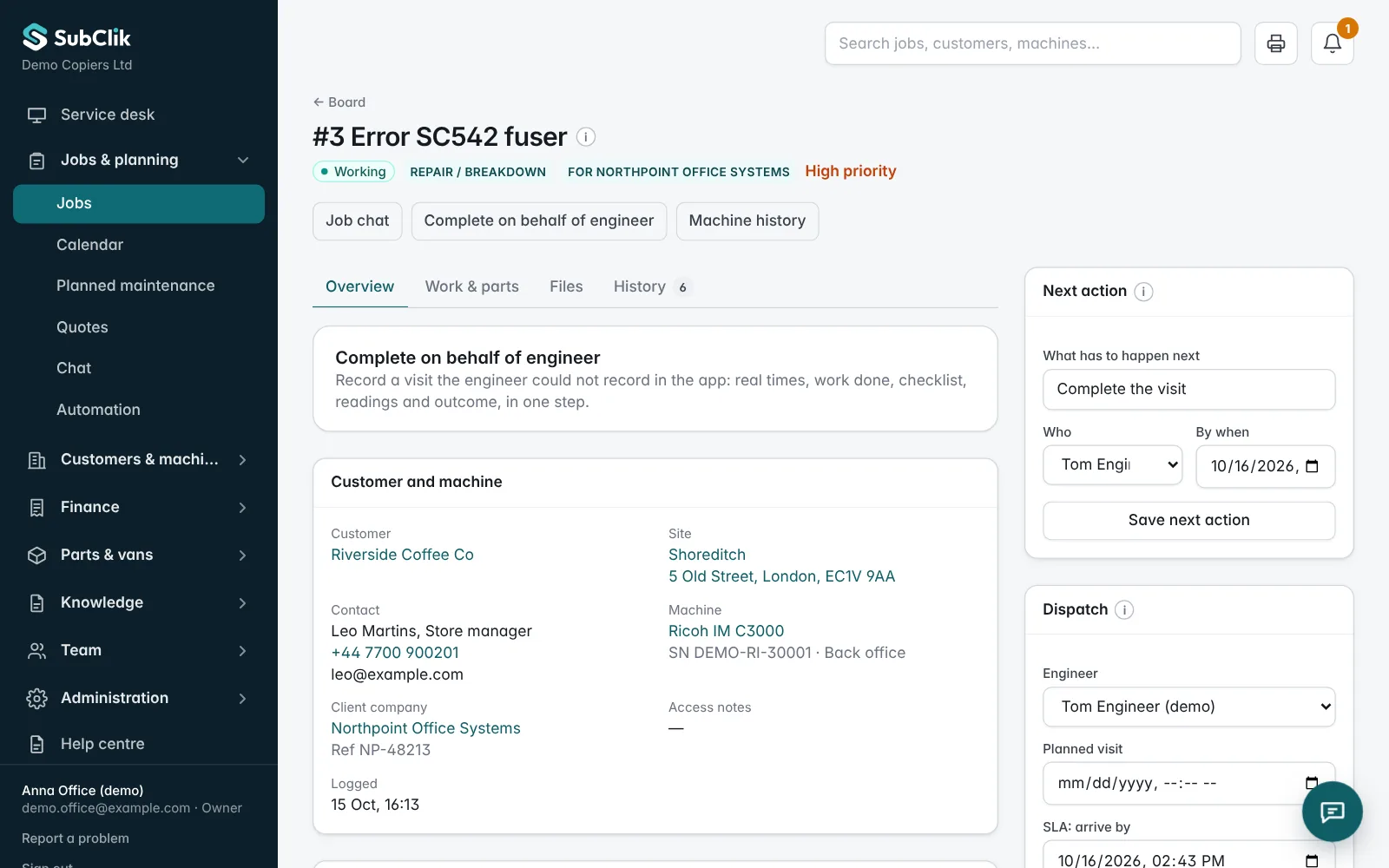
A service job in the office portal with the fault, machine, recorded time and parts
One job record: fault, machine, recorded time, parts and readings.

Main areas

Plan and follow service work.

Log a fault against the customer, site and machine. Assign an engineer, keep response times in view and review every visit before it is charged.

Explore the service desk

Give engineers everything on their phone.

Assigned jobs, machine details, what fixed the same fault before, checklists, parts, meter readings and the customer’s signature, even without signal.

Explore the engineer workspace

Plan the week and talk about the jobs.

A shared calendar coloured by engineer with drag and drop, and a team chat with a conversation for every job.

Explore planning and team chat

Know every machine and its history.

Customers, sites and machines with serial numbers, meters and previous visits. A QR label on each machine lets anyone report a fault.

Explore machine service history

Printers that report on themselves.

Daily meters and toner from every printer, and paper jams, error codes and doors open within a minute, with how often and how long each printer was stopped.

Explore printer monitoring

Jobs that open before the customer calls.

A service code, memory error or repeated jams opens a job by itself. Toner running out is listed for sending, with an optional email to the customer.

Explore automation

A portal for your customers.

Customers see their machines live, the service call in progress and their invoices, and report a fault or order toner in a few clicks.

Explore the customer portal

Turn completed work into invoices.

Price lists, quotes, contract coverage and click billing from automatic readings, invoices, credit notes and payments.

Explore contracts and billing

Connected to Xero and your team’s tools.

Invoices and payments in step with Xero, jobs in Google Calendar, Outlook or iPhone, alerts in Slack or Teams, and a read API.

Explore integrations

Everything in SubClik

Every firm gets the whole platform: the office portal, the engineer app, printer monitoring, automation, the customer portal and the integrations.

Service desk & jobs

  • Log calls against customer, site and machine
  • Job types with their own checklist and usual duration
  • Priorities and response times: accept by, arrive by, fix by
  • Live status from assigned to completed and reviewed
  • Office review: close, send back or reopen with a reason
  • Callbacks: return visits not charged unless you say why
  • Record a visit on behalf of an engineer
  • Search across jobs, customers and machines

Planning & team

  • Company calendar: month, week and day views
  • A colour per engineer; drag visits to another day, time or engineer
  • Engineers’ own calendar on the phone
  • Team chat, direct messages and a chat per job
  • Photos and documents in chat, read ticks, notifications
  • Roles: owner, admin, dispatcher, engineer, client viewer
  • Activity overview of what the team recorded

Engineer app

  • Assigned jobs with site, contact and machine details
  • Accept, travel, arrive, work and complete with real times
  • Works without signal and catches up when back online
  • Travel and labour time, mileage and daily odometer
  • Parts from the van stock, meter readings, photos
  • Checklists with pass / fail results
  • Customer signature and a PDF job sheet by email

Customers & machines

  • Customers, sites and contacts
  • Client companies you work for, each with its own rates
  • Machine records with serials, meters and service history
  • QR label per machine: report a fault without an account
  • Ask customers for meter readings by link
  • Readings that look wrong are held for checking
  • Import customers, sites and machines from Excel

Printer monitoring

  • SubClik Agent for Windows at the customer’s site
  • Finds printers in chosen networks and VLANs, or by IP
  • Daily meters for Ricoh, Kyocera, Canon, Konica Minolta, Sharp, Xerox, HP, Brother and Lexmark
  • Toner and ink, paper trays, waste box and drum
  • SNMP v1/v2c and secure, encrypted SNMPv3
  • Checked every minute: jams, error and service codes, doors open, toner low, memory errors
  • How often each problem happens and how long the printer was stopped
  • Paper jam counts per printer
  • Toner run-out forecast: days left per cartridge
  • Toner yield: real pages per cartridge against the maker’s figure, and toner cost per page
  • Parts wear: drum, fuser, transfer belt and maintenance kit, with a replacement date
  • Error and service code history per printer; firmware versions and when they changed
  • Backup agent: a second computer takes over the readings if the main one goes offline
  • Reports kept while the internet is down and sent later; the agent updates itself
  • Automatic link to your machines by serial number
  • Readings flow into contract click billing; suspicious ones are held for checking
  • Print audit with cost per page and possible saving
  • Read now, printer report and agent log on request from the portal

Automation

  • Service jobs opened automatically from error and service codes
  • Memory errors and repeated paper jams too, above a number you set
  • Priority and engineer from your own rule
  • Never two open jobs for the same machine
  • Toner to send list from the run-out forecast
  • Record what was sent; optional “toner is on its way” email
  • Toner sent leaves your warehouse stock automatically
  • What fixed this before: earlier fixes, fix codes and parts for the same error code

Reports & alerts

  • Copies, visits and engineer hours month by month, with charts
  • Reports for the whole fleet, each customer, each machine and each engineer
  • Machines with low use, many visits or costs above revenue flagged
  • Fixed-first-time rate and typical visit length per engineer
  • Morning email to the office when printers need attention
  • Customer emails: engineer on the way, arrived and finished
  • Automatic reminders for unpaid invoices and open quotes

Quotes, contracts & billing

  • Catalogue of parts, consumables and services with costs
  • Quotes with versions, validity and approval by link
  • Contract coverage for call-out, labour, travel and parts
  • Cost limits that need the client’s approval
  • Contract billing with click rates and included copies
  • Invoices from jobs, credit notes and payments
  • Xero: invoices and credit notes sent when issued, payments back
  • Charge exports for client companies

Stock

  • Main store and a stock location per van
  • Parts used on a job leave the van stock automatically
  • Stock movements kept with who and when
  • Purchase orders to suppliers; deliveries booked into stock
  • Warehouse restock: draft orders per supplier from the toner forecast, emailed from SubClik

Customer portal

  • Customers sign in and see their machines live
  • Status, toner bars, open problems and latest meter readings
  • Their service calls, including the one in progress
  • Their invoices: paid, due and overdue
  • Report a fault or order toner; the office gets it straight away
  • Quote approval, reading requests and fault reports by link
  • Job sheets sent by email after each visit

Integrations

  • Xero in a few clicks: customers matched or added, VAT per line
  • Calendar links for Google Calendar, Outlook and iPhone
  • Webhooks to Slack, Microsoft Teams, Google Chat, Zapier and Make
  • Events: printer problems, new job, job completed, invoice issued, invoice paid
  • Signed webhook messages
  • Read API with keys: printers, daily readings, events, monthly CSV
  • Monthly meter readings email and CSV export
  • QuickBooks Online, the same as Xero
  • GoCardless Direct Debit: invoices collected on their due date
  • Stripe card payment link on every invoice

Security & reliability

  • Each firm’s data kept apart in the database itself
  • Optional two-step sign-in
  • Audit log of changes with old and new values
  • Nightly encrypted backups with a tested restore
  • Data stored in the UK (London); data processing agreement

Set up around the way your team works.

Configure your job types, checklists, parts and service prices. Keep your company details, working hours and response times in one place. Anything beyond the supported settings is discussed with you separately.

Find the right setup for your team.

Tell us how your office and engineers work today, and we’ll show you the parts of SubClik that fit.