
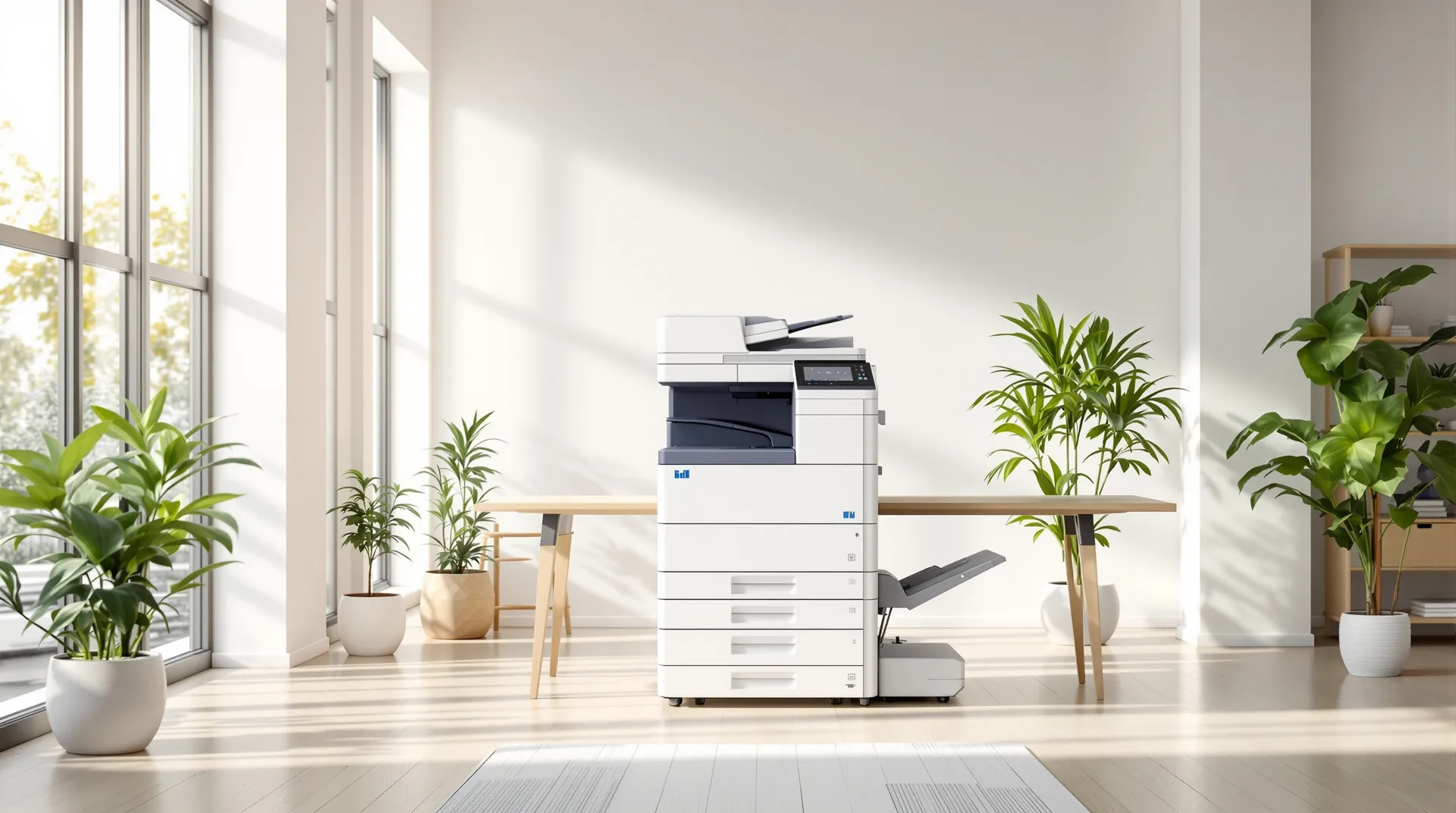
SubClik Print
Secure printing that works on every copier.
People print once and collect at whichever machine is nearest, with a card, PIN or their phone. When a machine breaks down, their jobs move to another one. For schools and businesses, run on site or from the cloud.
- Every copier brand
- Microsoft 365 and Google Workspace
- Keeps printing offline
- No set-up fee
Signed in with card
S. Hughes
412 pages left this month
- Year 9 forces worksheet.pdf12 pages · 30 copies · mono · double-sided
- Parents evening letter.pdf1 page · colour
- Lab risk assessment.pdf4 pages · mono
Everything a shared printer needs. Nothing it doesn’t.
One print server at the site, one portal for the office, and a release screen at every machine.
Release at any machine
Everyone prints to one secure queue and collects at whichever machine is nearest, with a card, a PIN, a password or their phone. Nothing sits in the tray for others to read.
Every brand, no vendor driver
Konica Minolta, Ricoh, Canon, Kyocera, Sharp, Xerox, HP, Brother and the rest. Computers print through Windows’, macOS’ and ChromeOS’ own IPP driver.
Moves jobs when a machine breaks
Before anything is sent, the server checks the machine. Jammed, out of paper or offline? People pick another machine on the screen, and their documents follow.
Scan to wherever people work
Scan to your own email, a shared or network folder, OneDrive, SharePoint, Google Drive or Dropbox, using the copier’s ordinary scan-to-email button.
Microsoft 365 and Google Workspace
Bring people in from Microsoft Entra ID or Google Workspace and keep them in step, or add them by hand or from a spreadsheet.
Local or cloud
Run everything on a server at the site, or manage it from the SubClik portal with a small connector on site. Printing carries on when the internet is down.
Release from a phone
Scan the QR code on the machine and release from your phone. No app to install and no card needed.
Quotas and credit requests
Monthly page limits per person, colour and double-sided rules, and credit requests the office approves in a click.
See the real screens.
Screenshots of SubClik Print itself, with demo data: the screen by the machine and the portal for the office and for each person.
At the machine
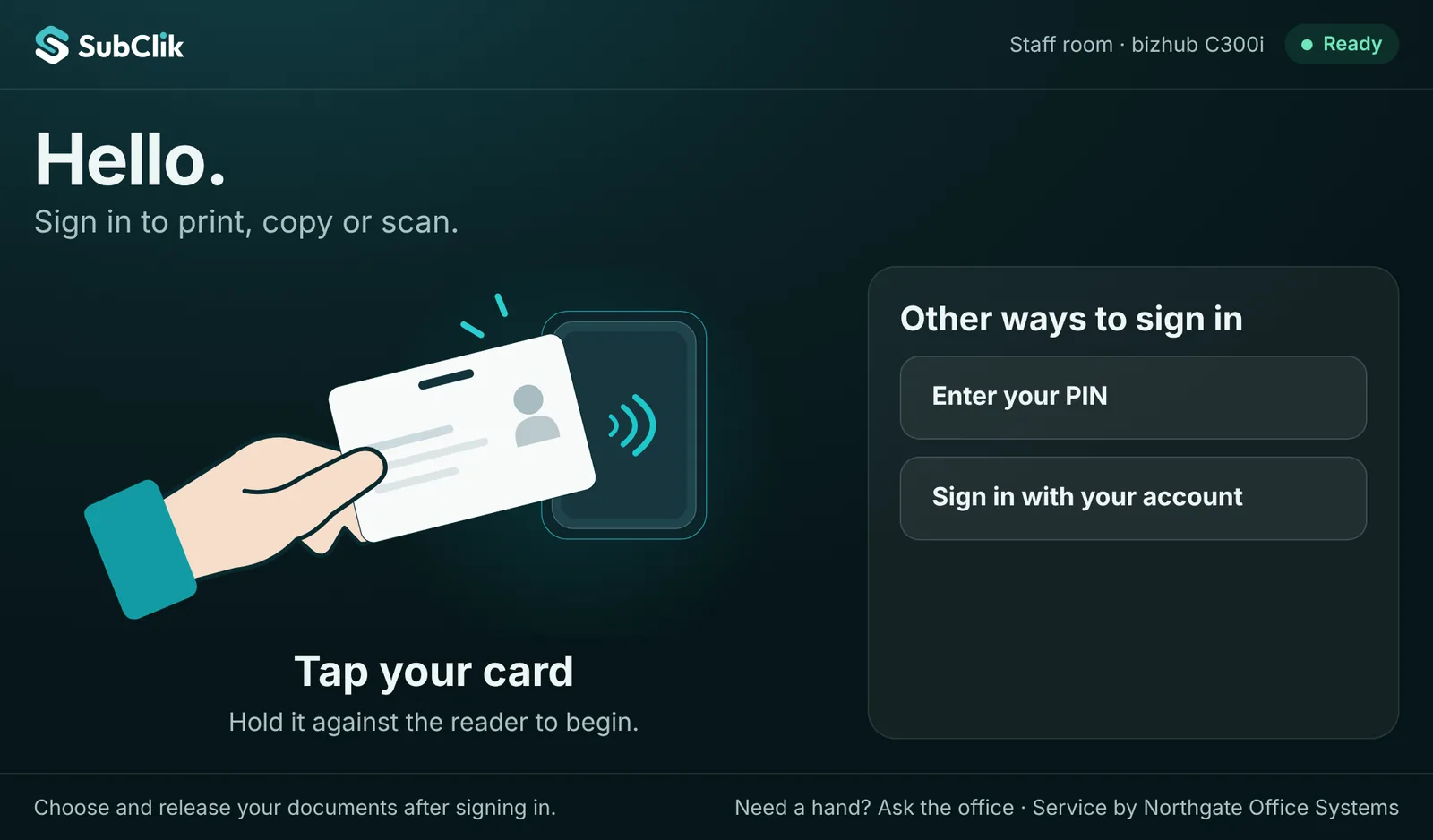
Sign in at the machine with a card, PIN or account 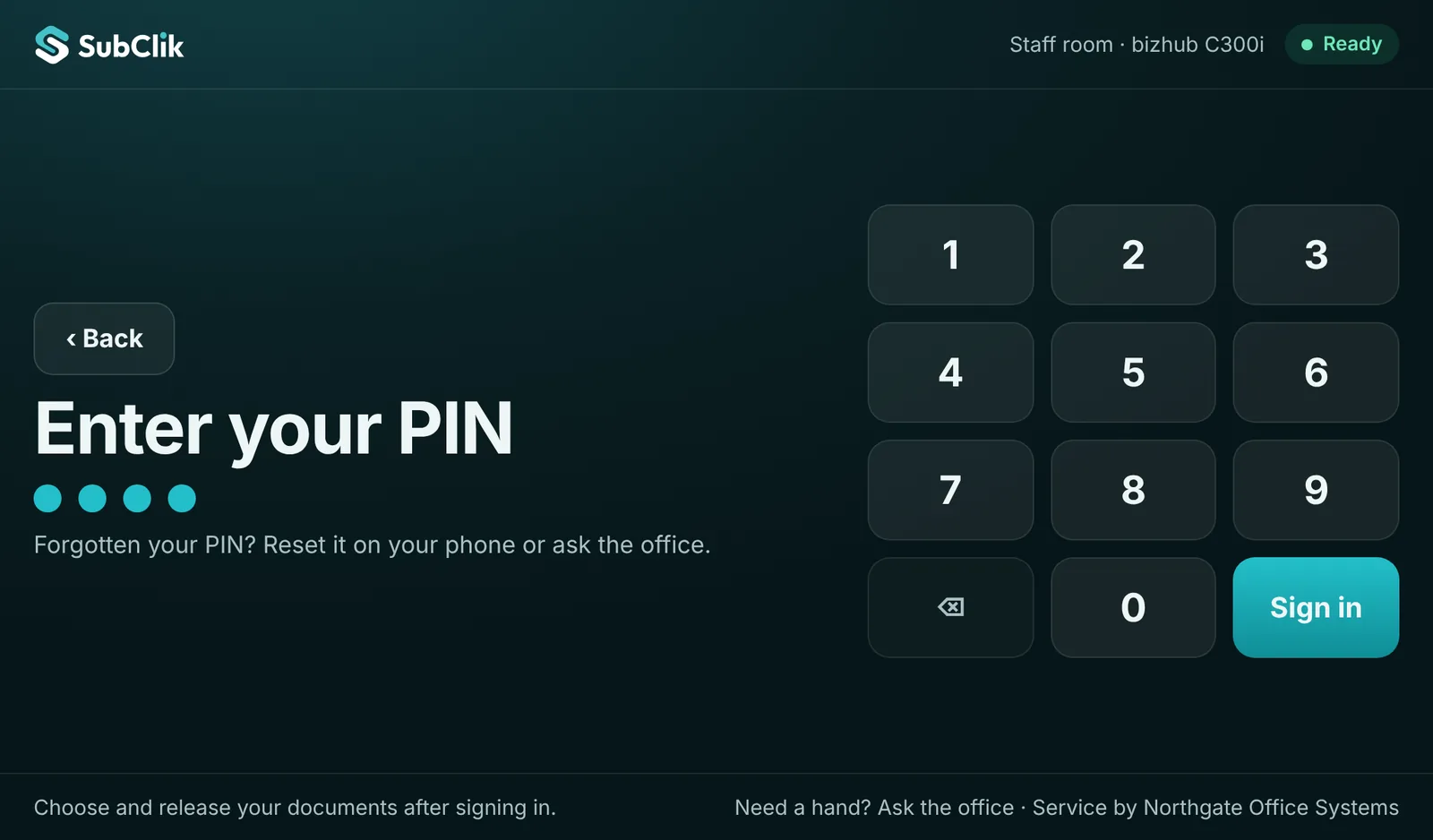
Large PIN keypad for the copier’s touch screen 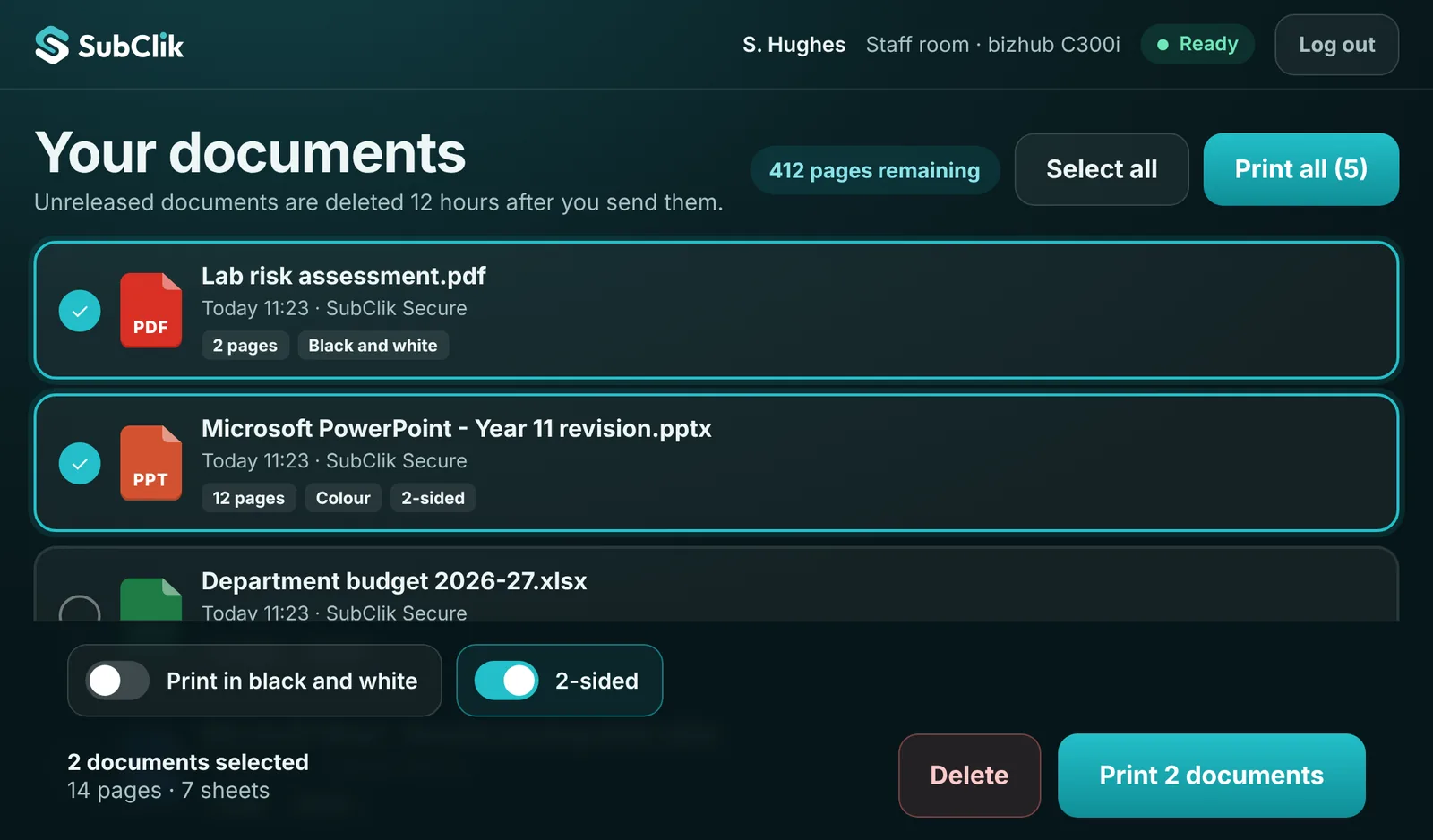
Choose documents, print in black and white or 2-sided, or print all 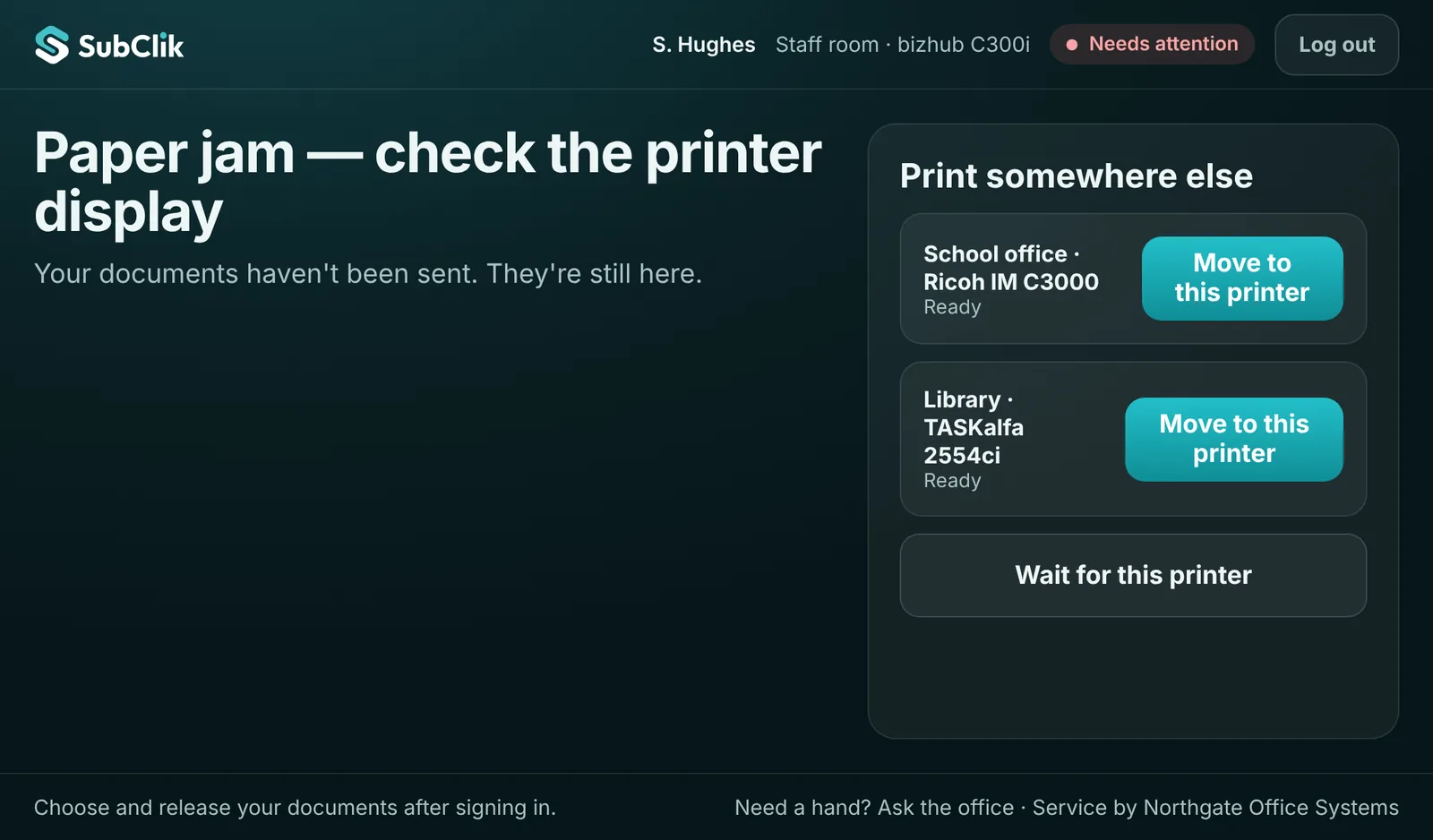
A machine jams: documents move to the next machine in one tap 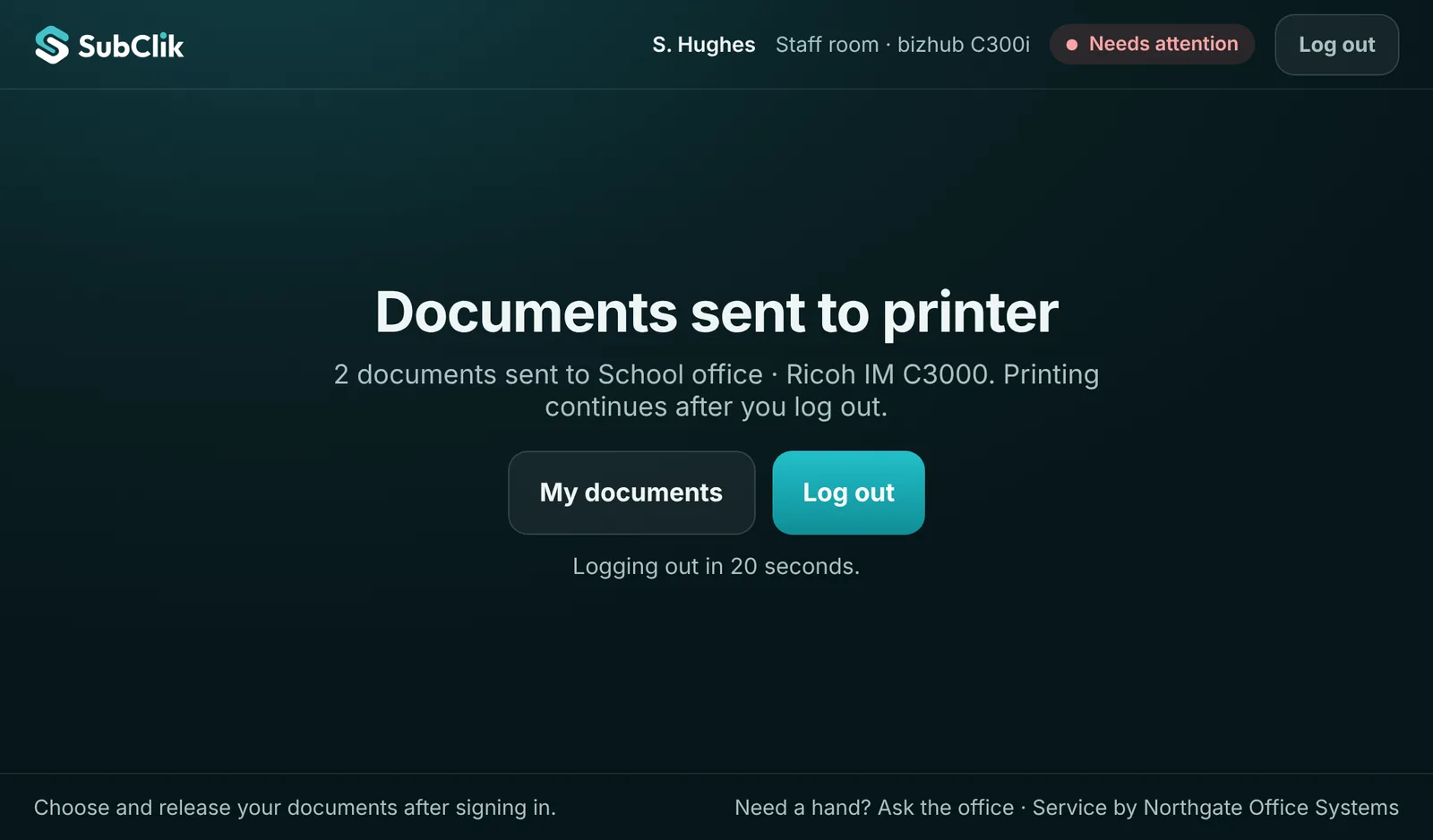
Sent, and signed out automatically
In the portal
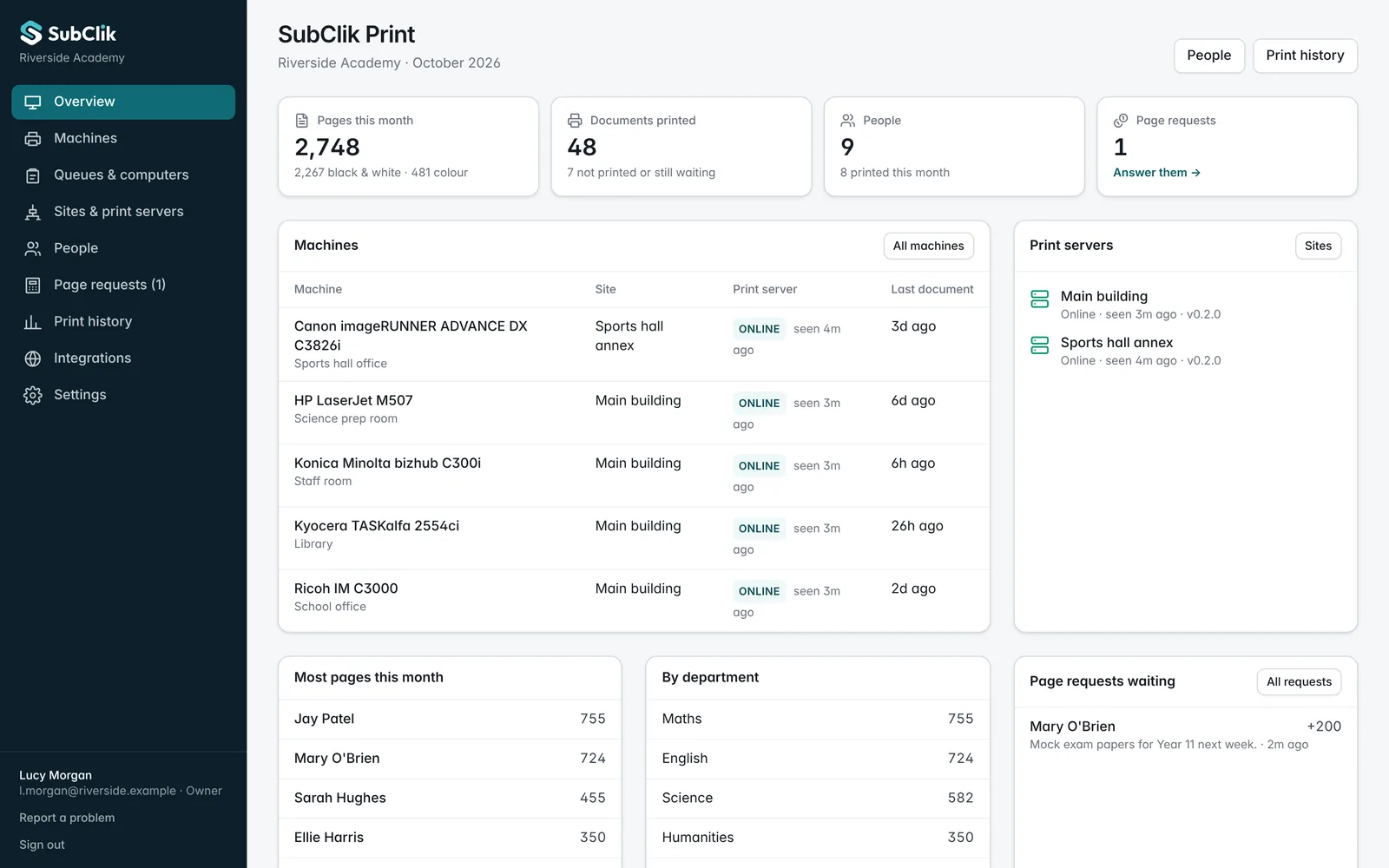
The office overview: pages, machines, print servers and requests 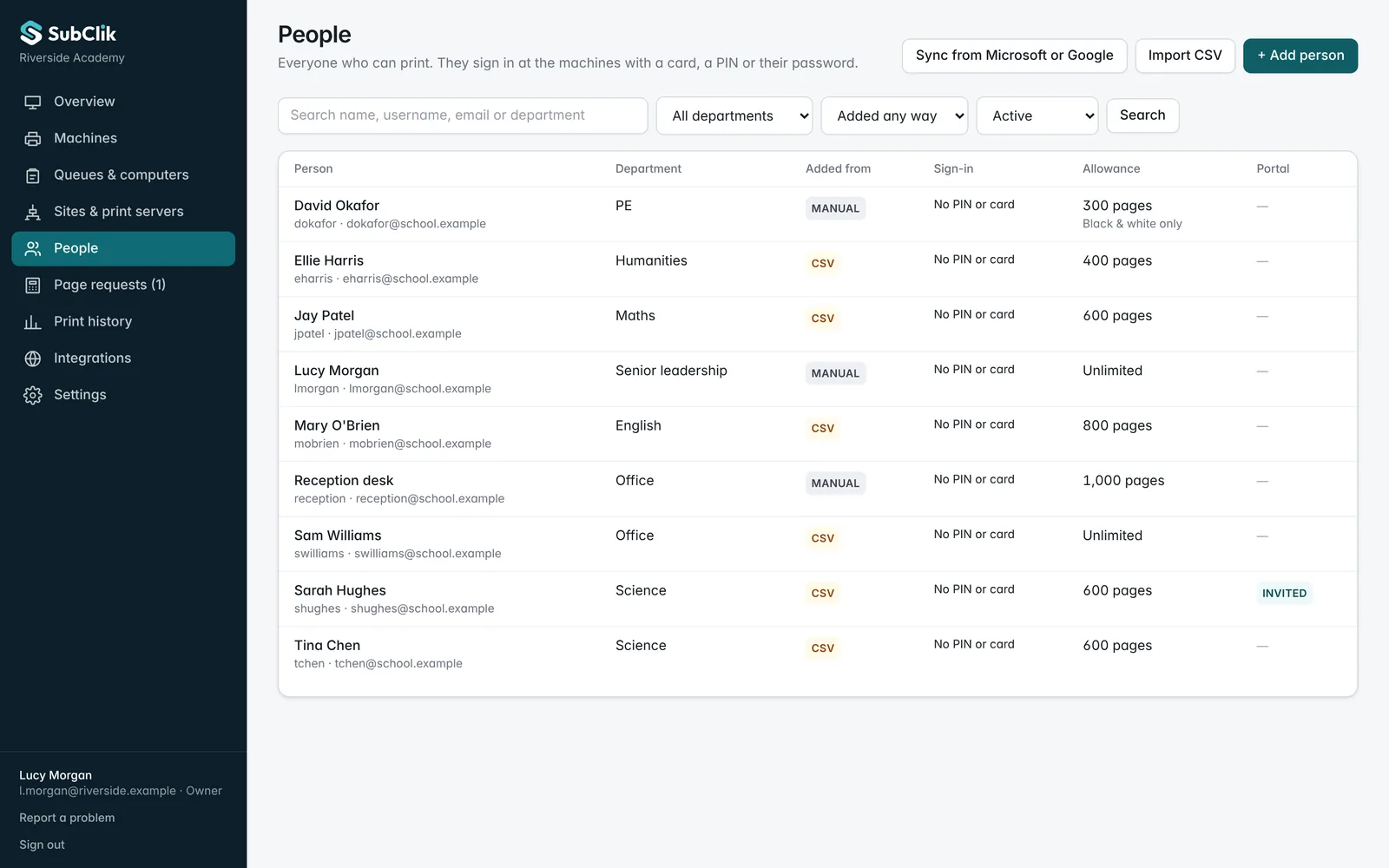
People from Microsoft 365, Google, a spreadsheet or added by hand, with allowances 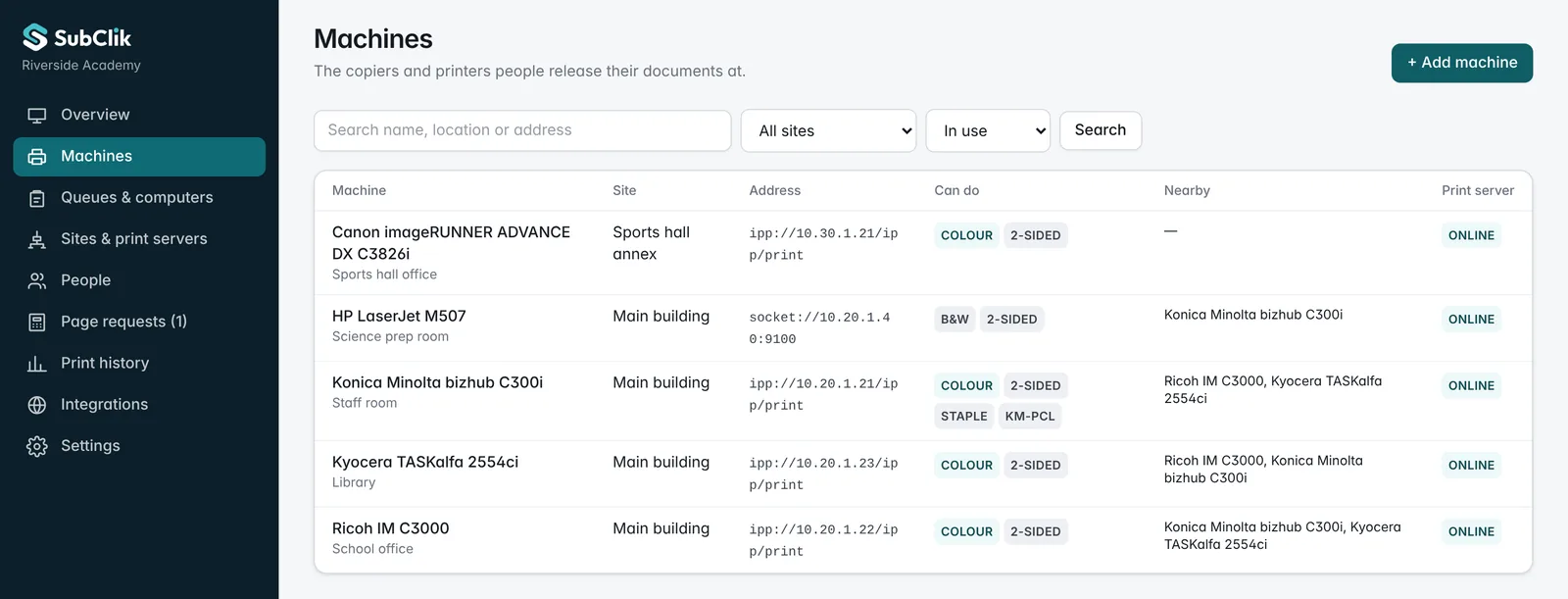
Every brand in one list, each with its nearby alternatives 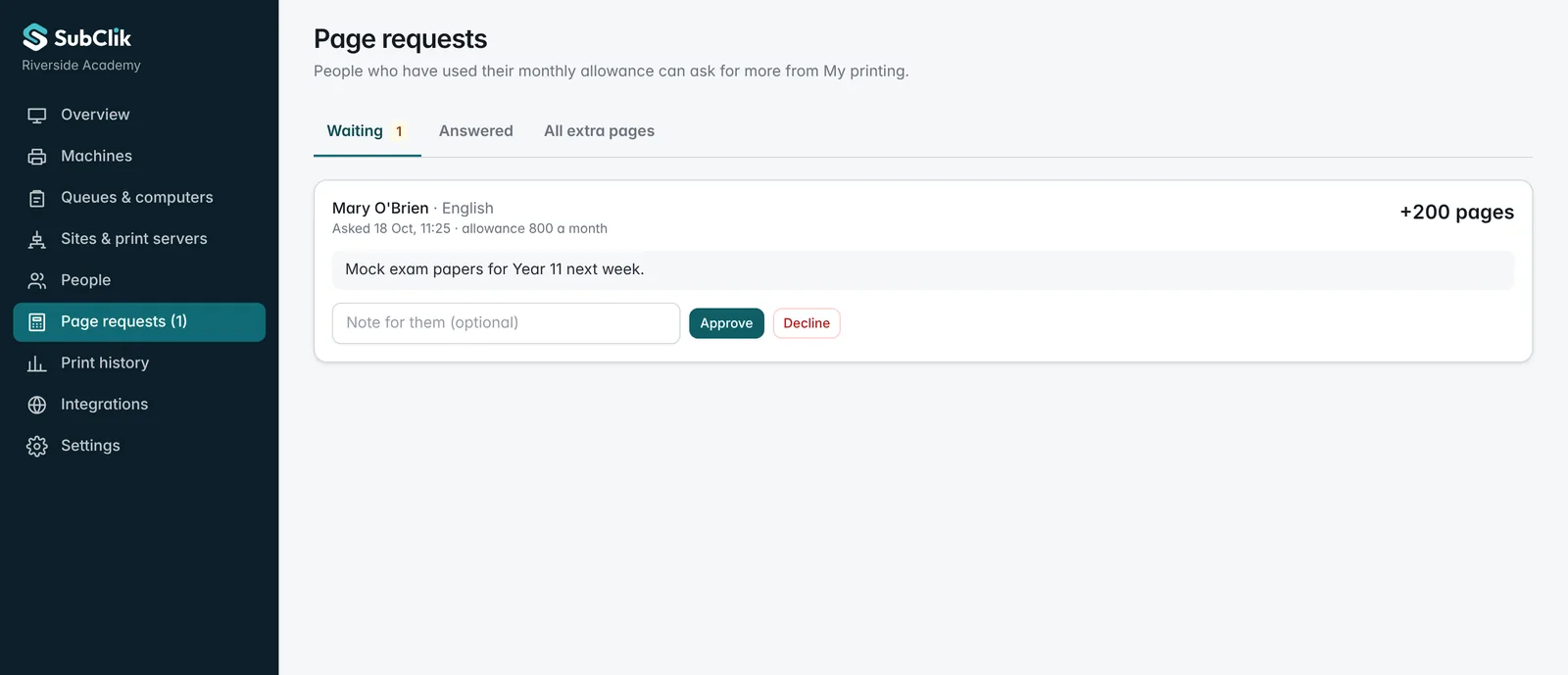
Requests for more pages, approved in one click 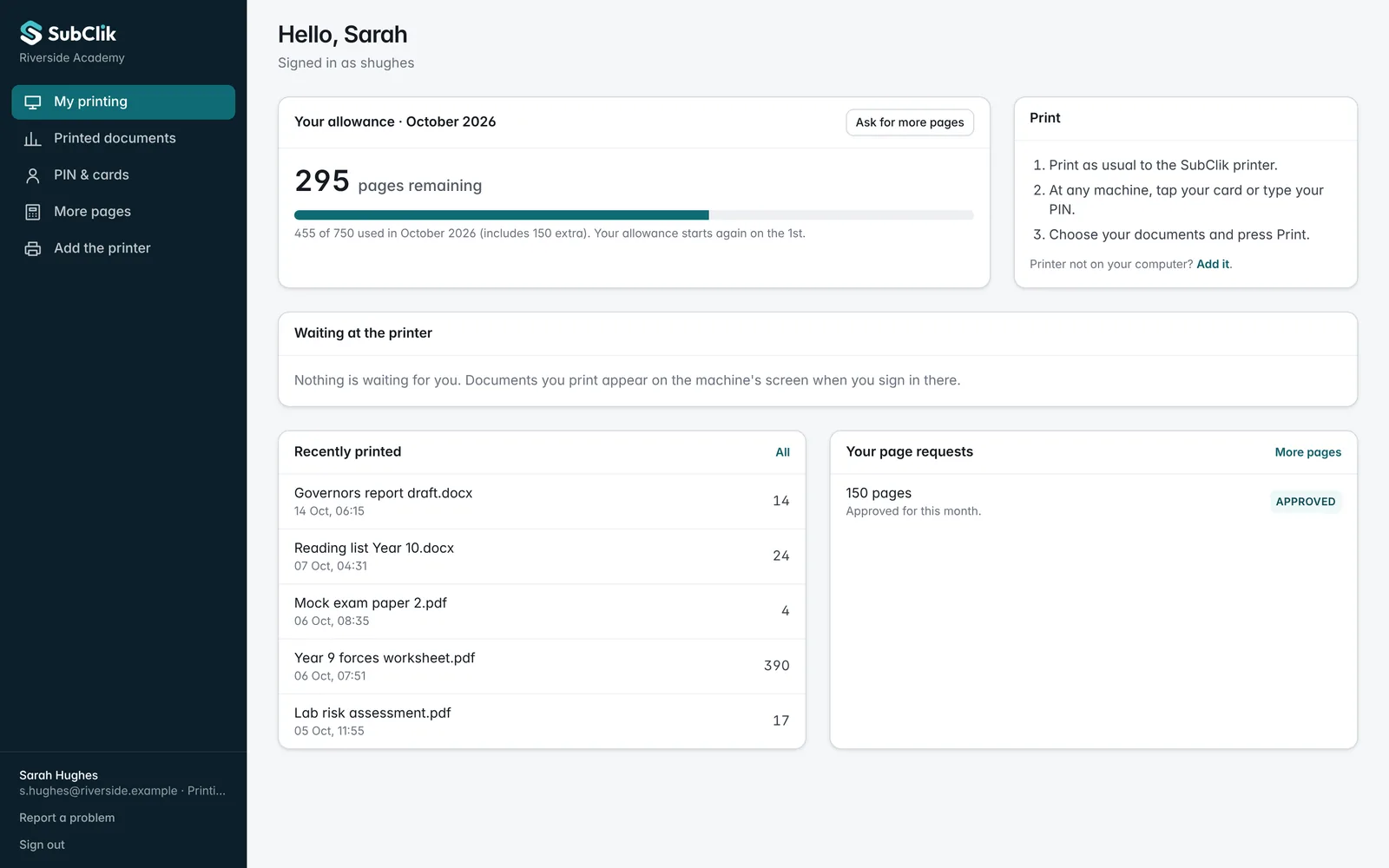
Each person’s own page: allowance, history and requests
In more detail
A broken machine never stops the printing.
Before sending, the server asks the machine how it is. If it is jammed, out of paper, has a door open or is offline, nothing is sent and the screen shows the machines you set as its alternatives, with their state.
A job already on a machine that stops is cancelled there first, and only sent to the new machine once the cancel is confirmed. If some pages already came out, the screen asks before printing it again.
This machine has a paper jam
Nothing was sent to it. Your 2 documents are safe.
Print somewhere else
- Ricoh IM C3000School office · 20 mReadyMove here
- Kyocera TASKalfa 2554ciLibrary · first floorReadyMove here
Quotas without the arguments.
Give each person a monthly page allowance, or none. Turn colour off for some, make double-sided the default for others. People see what is left on the release screen and in their own portal.
Run out before the end of the month? They ask for more with a reason, and the office approves or declines it in the portal. Every change is recorded.
Credit request · Mary O’Brien · 200 pages
“Mock exam papers for Year 11 next week.”
Mary O’Brien · English
788 / 800
Sarah Hughes · Science
338 / 750
Jay Patel · Maths
212 / 600
Lucy Morgan · Senior leadership
940 / no limit
Scanning that lands in the right place.
Copiers already know how to scan to email. Point them at the SubClik server and scans go to the person’s own inbox through your Microsoft 365 or other mail service, to a shared or network folder, or to OneDrive, SharePoint, Google Drive or Dropbox once the account is connected in the portal.
Only scans from your printers are accepted, and only for known people and configured folders. It is not an open mail relay.
People come from the directory you already have.
Connect Microsoft Entra ID (Microsoft 365) or Google Workspace and people, departments and sign-in names stay in step on their own. Smaller sites add people by hand or import a spreadsheet.
Cards are registered by tapping them at a machine and signing in once. A card that belongs to someone else is refused, and the same card and PIN work at every site of the organisation.
Everything in SubClik Print.
Included for every machine. No modules to buy.
At the machine
- Sign in with a card, PIN, username and password, or phone
- Every waiting document with its file type, pages and copies
- Print one, several or all at once
- Switch a job to black and white or double-sided before printing
- Pages left this month on screen
- Choose another machine when one has a fault
- Register your own card by tapping it once
For the office
- People, departments and allowances
- Credit requests approved in one click
- Machines, queues and nearby alternatives
- Print history by person, department and machine
- Document names hidden from reports if you wish
- Sign-in and security events recorded
- Several sites in one organisation
For each person
- Their own print history
- What is left this month
- Ask for more pages with a reason
- Remove a lost card themselves
- Scan to their own email
Under the bonnet
- Every copier brand through standard IPP, no vendor driver
- Windows, macOS and Linux print server
- Keeps printing and releasing when the internet is down
- Jobs cancelled on a broken machine before being sent again, never printed twice
- PINs and cards stored only as keyed hashes
- Encrypted connection to the portal, outbound HTTPS only
- Updates published here with release notes
For education
Built for schools, from nursery to university.
Stop paying for printing nobody collects, keep pupil documents out of the tray and keep lessons going when a copier jams. Allowances for staff and pupils, Chromebooks included.
On site or in the cloud.
Printers live on the site’s private network, so something always runs there. You choose where it is managed from.
| Question | Local | Cloud |
|---|---|---|
| Where documents wait | On the print server at your site | On the connector at your site |
| Set up and managed | In the SubClik portal, or a local file | In the SubClik portal |
| Without internet | Everything keeps working | Printing and release keep working from the last copy; reports follow later |
| What you open in the firewall | Nothing from outside | Nothing from outside: outbound HTTPS only |
What needs the manufacturer.
Straight answers, so nobody is surprised after installation.
- Our screen on the copier’s own panel, and copy control. Replacing the copier’s sign-in screen and blocking copying until someone signs in need each manufacturer’s app platform (for example Konica Minolta OpenAPI, Ricoh SmartSDK, Canon MEAP, Kyocera HyPAS, HP Workpath, Xerox EIP). We are adding them brand by brand. Until your brand is ready, people release from a tablet with a card reader by the machine, the copier’s built-in browser where it has one, or their phone.
- Older machines that cannot print PDF. They need a queue with the manufacturer’s driver. Jobs from that queue only move to machines of the same family, so nothing prints as garbage.
- Printers on port 9100. They cannot report back or cancel a job, so a job is marked delivered once sent and is not moved afterwards. A fault is still caught before sending.
- Cloud still needs a small program on site. The connector only connects out over HTTPS, so no ports are opened. Machines with Microsoft Universal Print or the maker’s own cloud are the only exception.
For copier dealers
Recommend SubClik Print to your customers.
Secure release that works on every brand you sell and service, with your company named on the release screen.
Copier dealers resell SubClik Print under partner terms: you bill your customer, we run the service. Use it alongside the SubClik service desk and SubClik Monitor for meters, toner and faults.
Fewer “the printer is broken” calls
When a machine jams, people move their job to the next machine themselves. The school keeps printing while your engineer travels.
One answer for a mixed fleet
No per-brand print software to learn. The same server, screen and portal on every make and model.
Win the account, keep the account
Release, quotas and scanning are why customers stay. Offer them on your next tender alongside the copiers.
Set up in an afternoon
Install on the customer’s server, enter the pairing code, add the queues by Intune or Group Policy. No drivers to roll out.
Questions
Who is SubClik Print for?
Do we need to install anything on every computer?
What happens when a copier breaks down?
Can it replace the copier’s own sign-in screen?
How is it priced?
Is it part of the SubClik service desk?

Try SubClik Print with sample machines and people.
Your own demo organisation with sites, machines, queues, staff and print history, ready in a minute. Free for 14 days, no card.